
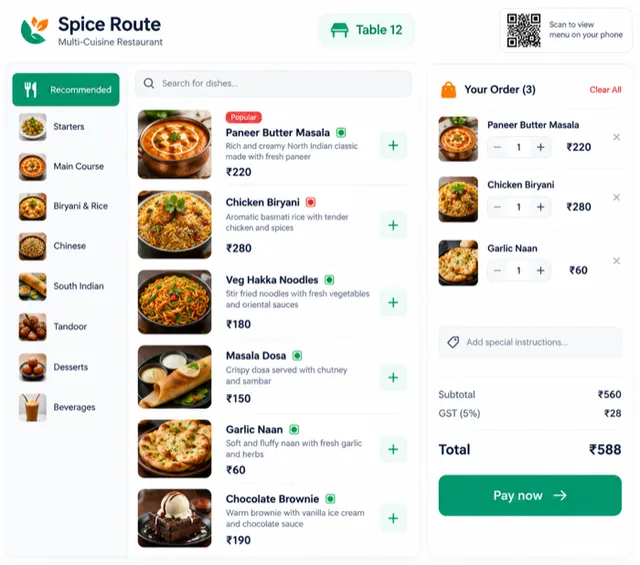
Menus & table orders
Manage menu availability, table orders and optional QR ordering from the same workflow.
Made to fit.
Made to fit.
Hospitality
From the first order to the end-of-day close.
Connect restaurant menus, table orders, kitchen tickets, billing and daily operations in one management workflow.
The bigger picture
Restaurant management goes beyond a QR menu. An order needs to reach the kitchen, changes need to reach the right person, and the bill needs to match what was served. We connect the front of house, kitchen and accounts around that journey.
The first release follows your service model, whether it is table service, takeaway or a combination. QR ordering remains an option within the wider restaurant management system.
Work is split across tools that do not talk to each other, so menus & table orders needs the same data typed more than once.
Nobody can answer a simple question - how many are pending, what is stuck, who owns it - without asking three people.
Reports are prepared manually before reviews, which means decisions are based on last week's numbers.
Staff compensate with WhatsApp groups and personal spreadsheets; when someone leaves, that knowledge leaves with them.
There is no audit trail for who changed what, which becomes a problem the moment a client or auditor asks.
The current tooling was bought for a different process and is now worked around rather than used.
Inside the scope
Explore what goes into restaurant management software.
Manage menu availability, table orders and optional QR ordering from the same workflow.
Route tickets, modifiers and status updates between the service team and kitchen.
Handle bills, payment records and end-of-day settlement with the checks your team needs.
Track agreed stock inputs, staff responsibilities and daily reports across locations.
How we work
Map how an order moves from the table or counter to the kitchen and billing desk.
Set up the menu, roles and devices, then validate a complete service cycle.
Train the team and refine the workflow before extending to other outlets.
Security & compliance
Role-based access for floor staff, kitchen and management.
Bill changes and approvals retained for review.
Backup and recovery steps included in the rollout plan.
Yes. QR ordering is an optional part of the restaurant solution alongside staff-led ordering, kitchen flow and billing.
We review the POS interfaces and hardware before agreeing an integration or a replacement plan.
Let's work together
Tell us what you are building or what needs to work better. We will help you define the next step.